Branding SharePoint 2010 Collaboration Sites – Part 2 in a Series

December 29th, 2009 Buta 4 comments

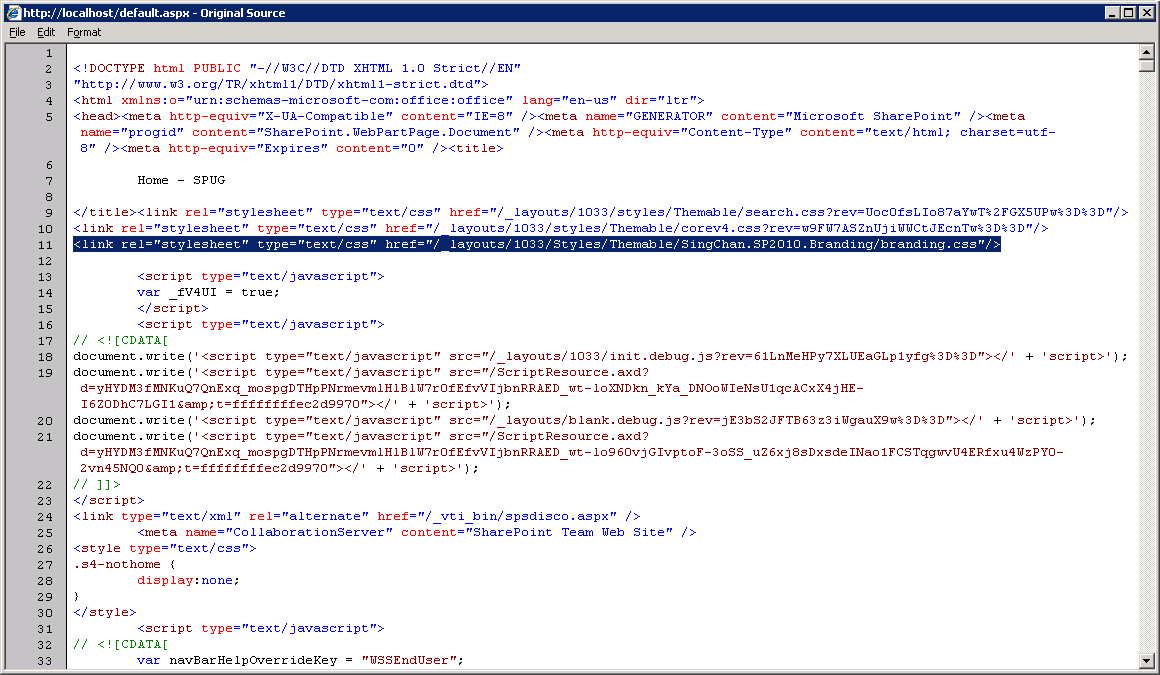
In part one of this series on branding SharePoint 2010 collaboration sites I posted a bit about how the new Theming engine works in SharePoint 2010. In this post, we’ll be going over the new and improved CSSRegistration control in SharePoint 2010.

A history lesson; the CSSRegistration control in SharePoint 2007

The CSSRegistration control in SharePoint 2007 basically has one property you can set, the Name is the Url to the CSS file that you want to register. When you register a style sheet through the control, it adds the CSS file to an alphabetically sorted list. The style sheets in this list are then emitted as HTML <link> elements by the CSSLink control.

If you required one CSS file to be emitted before another, you would need to name them accordingly. For example:

<SharePoint:CSSRegistration Name="foo.css" runat="server" />
<SharePoint:CSSRegistration Name="bar.css" runat="server" />

Even though I registered foo.css before bar.css, the HTML on the rendered page would look like so:

<link rel="stylesheet" type="text/css" href="bar.css"/>
<link rel="stylesheet" type="text/css" href="foo.css"/>
<link rel="stylesheet" type="text/css" href="/_layouts/1033/styles/core.css?rev=..."/>

bar.css would come before foo.css and what’s this core.css doing here? Somehow, someone at MS decided that the core.css containing ALL of the base CSS rules for WSS should override any custom CSS!

As a workaround, you could set the DefaultUrl property for the CSSLink control to point to a single CSS file that would come after core.css, and then use @import to link to any additional custom CSS files.

The fact that core.css was emitted after any style sheets registered using CSSRegistration made the CSSRegistration control all but useless in 2007.

The shiny new CSSRegistration control in SharePoint 2010

So things are much better in the SharePoint 2010 world. If you examine the documentation for the SharePoint 2010 version of the CSSRegistration control, you’ll find the addition of the following properties, which currently have no descriptions to their usage in the SDK:

RevealToNonIE (boolean)

I assume this property would allow you to register IE-only style sheets.  This doesn’t seem to be working in Beta 2 though as it doesn’t matter whether I set this to true or false, the CSS files would get emitted regardless of the browser I was using.

ConditionalExpression (string)

Another assumption that this would allow us to set certain conditions in order for the style sheet to appear in HTML. Nothing at all in the way of documentation nor could I find any examples in the 14 Hive as of Beta 2.

This property is an Internet Explorer Conditional Comment. For example, if we wanted to link to a style sheet specific to IE 7 or greater, we can do this:

<SharePoint:CSSRegistration Name="foo.css" ConditionalExpression="gte IE 7" runat="server" />

The following markup would be emitted:

<!--[if gte IE 7]>
<link rel="stylesheet" type="text/css" href="foo.css"/>
<![endif]-->

After (string)

This property is what was sorely missing in 2007. We can now tell the CSSLink control to emit the registered style sheet after another CSS file. You can either define just the leaf filename, ie bar.css or the path to the CSS file, ie /foo/bar.css. If you don’t use the After property, style sheets will still be emitted by alphabetical order. For example:

<SharePoint:CSSRegistration Name="bar.css" After="foo.css" runat="server" />
<SharePoint:CSSRegistration Name="foo.css" runat="server" />

bar.css is emitted after foo.css because we specified the After property when we registered bar.css:

<link rel="stylesheet" type="text/css" href="foo.css"/>
<link rel="stylesheet" type="text/css" href="bar.css"/>
<link rel="stylesheet" type="text/css" href="/_layouts/1033/styles/Themable/corev4.css?rev=..."/>

corev4.css IS STILL emitted after everything else for whatever reason, unless you use the After=”corev4.css” property when registering AND there are a few gotchas that you need to be aware of.

Gotcha 1: You’re never sure of the sort order

As of Beta 2, there’s some weirdness when you register multiple style sheets that all require to be after the same CSS file. They are no longer sorted alphabetically but in most cases they end up being last in first out:

<SharePoint:CSSRegistration Name="1.css" After="corev4.css" runat="server" />
<SharePoint:CSSRegistration Name="2.css" After="corev4.css" runat="server" />
<SharePoint:CSSRegistration Name="3.css" After="corev4.css" runat="server" />

I was expecting 1, 2, 3… but instead I get 3, 2, 1…

<link rel="stylesheet" type="text/css" href="/_layouts/1033/styles/Themable/corev4.css?rev=..."/>
<link rel="stylesheet" type="text/css" href="3.css"/>
<link rel="stylesheet" type="text/css" href="2.css"/>
<link rel="stylesheet" type="text/css" href="1.css"/>
Gotcha 2: I need something AFTER another thing…

The other thing to take note on is when you need to define nested After. For example, I need to make sure that the style sheets are emitted in the order 1, 2, 3, 4:

<SharePoint:CSSRegistration Name="1.css" runat="server" />
<SharePoint:CSSRegistration Name="2.css" After="1.css" runat=”server" />
<SharePoint:CSSRegistration Name="3.css" After="2.css" runat="server" />
<SharePoint:CSSRegistration Name="4.css" After="3.css" runat="server" />

We don’t get what we would expect the result to be, instead it comes out as 1, 4, 3, 2:

<link rel="stylesheet" type="text/css" href="1.css"/>
<link rel="stylesheet" type="text/css" href="4.css"/>
<link rel="stylesheet" type="text/css" href="3.css"/>
<link rel="stylesheet" type="text/css" href="2.css"/>

It looks like as a general rule of thumb, you should register the style sheet which comes after another one FIRST. So in order to get 1, 2, 3, 4 we need to define our registration like so:

<SharePoint:CSSRegistration Name="4.css" After="3.css" runat="server" />
<SharePoint:CSSRegistration Name="3.css" After="2.css" runat="server" />
<SharePoint:CSSRegistration Name="2.css" After="1.css" runat="server" />
<SharePoint:CSSRegistration Name="1.css" runat="server" />

EnableCssTheming (boolean)

Remember those “Themable folders” and compile time directives in the CSS files I mentioned about in Part 1? The EnableCssTheming property tells the SharePoint 2010 theming engine to recompile the style sheet using any directives found within the registered CSS file if the file’s location is in one of those “Themable” folders. EnableCssTheming is “true” by default, you have to explicitly set it to “false” if you do not want the registered style sheet to be parsed and re-compiled.

For example:

<SharePoint:CSSRegistration Name="<% $SPUrl:~sitecollection/_layouts/1033/Styles/Themable/foo.css %>" runat="server" />

If we don’t have a theme selected, the HTML emitted will be:

<link rel="stylesheet" type="text/css" href="/_layouts/1033/Styles/Themable/foo.css"/>

But if there’s a theme applied to a site, it will be in one of two locations, where [1234567] and [12345678] are hex values that represent the theme name and CSS file paths. The ctag QueryString parameter is a simple integer counter used for cache invalidation. It increments up every time a web’s theme gets changed.

If the theme was applied through the web UI:

<link rel="stylesheet" type="text/css" href="/[WEB PATH]/_themes/[COUNTER]/foo-[12345678].css?ctag=[COUNTER]"/>

Or, if the theme was set programmatically using the ThmxTheme class and shareGenerate was defined as “true” it will be located here:

<link rel="stylesheet" type="text/css" href="/_catalogs/theme/Themed/[1234567]/foo-[12345678].css?ctag=[COUNTER]"/>

Just to re-iterate, the two three locations where the “Themable” folder can be located are:

  1. In the “14 hive” at %ProgramFiles%\Common Files\Microsoft Shared\Web Server Extensions\14\TEMPLATE\LAYOUTS\[LCID]\STYLES\Themable;

    Where [LCID] is the Locale ID. In North America, the default is “1033” for English (US).

  2. In each web’s Style Library/Themable. These CSS files only affect the specific web and all languages.
  3. In each web’s Style Library/[LANG]/Themable.

    These CSS files only affect the specific web and a specific language. In North America, the default is “en-US

You can place your CSS files inside sub-folders of Themable for neatness but not the other way around… /Style Library/Themable/foo/bar.css will be recompiled by SharePoint 2010’s theming engine while /Style Library/foo/Themable/bar.css will not.

In the next episode…

Whew! We’ve now gone through how to register a style sheet so that it’s compatible with the new SharePoint 2010 theming engine.

My next post will be how to get our custom style sheets onto the out-of-the-box collaboration sites without having to create custom site templates or master pages. We’ll revisit an old friend (or new acquaintance to some), the Delegate Control!

UPDATE:

Branding SharePoint 2010 Collaboration Sites: Part 1 in a Series

December 23rd, 2009 Buta 1 comment

Themes are dead! Long live themes!

The “awkward” themes system based on CSS and images in SharePoint 2007 is going the way of the dodo. No more deploying into the “12 hive” and having to modify the SPThemes.XML to register your theme.

As you may already know, in SharePoint 2010, themes are now just a set of colour and font values specified in an Office .thmx file. You upload a .thmx file into the Themes catalog and a site administrator can “theme” their site using the updated Themes web interface.

Unfortunately, if you want to brand any of the out-of-the-box SharePoint 2010 collaboration sites beyond colours and a couple of font choices, you will need to jump through a few hoops. All of which I’ll try to explain to you in this series of blog posts.

How does the SharePoint 2010 Theming Engine work?

So what happens behind the scenes when you select a 2010 theme to apply to your site? How do the new colours specified in the .thmx file and/or the colours you’ve chosen through the web interface get applied to your site?

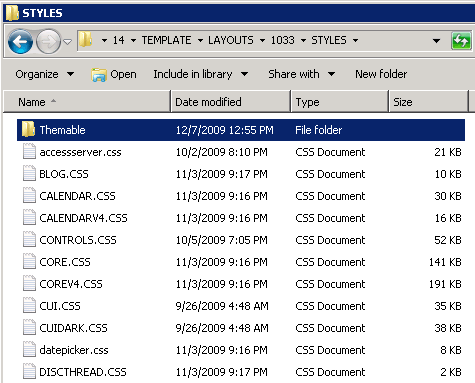
There  are essentially two main locations where CSS files for SharePoint 2010 are stored:

Themable folder in 14 Hive

Themable folder in 14 Hive

  1. In the “14 hive” at %ProgramFiles%\Common Files\Microsoft Shared\Web Server Extensions\14\TEMPLATE\LAYOUTS\1033\STYLES;

    The exact location of the CSS files varies depending on whether you have a language pack installed and have another language as the default. I’m in North America and the Locale ID for the majority of our projects is 1033 for English (US).

    These CSS files are used by all webs located on the front-end web server.

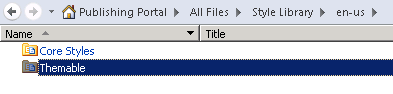
  2. In each web’s Style Library. These CSS files only affect the specific web.
Themable folder in web's Style Library

Themable folder in web's Style Library

Oh, btw, when I say “web,” I mean SPWeb… if you’re a SP Dev, you’ll know what I’m talking about, otherwise think “site” but not “SPSite”…

So you must be thinking, “that’s exactly the same as in SharePoint 2007!” And you would be right, but if you look in the first location, you’ll notice a folder named “Themable”…

If you look in the Style Library of a team site, you won’t find anything… :-) BUT if you were to create a Publishing Portal and look inside the Style Library, you’ll find a “Themable” folder as well…

Taking a look at some of the CSS files, you’ll notice some things in the CSS comments like:

/*[ReplaceColor(themeColor:"Light1")]*/
background-color: #fff;

/*[RecolorImage(themeColor:"Accent6",method:"Tinting")]*/
background-image:url("/_layouts/images/selectednav.gif");

What this? Compile time directives?

Yup, when the user selects a theme for a web, SharePoint goes and recompiles the CSS and places the compiled CSS files into the web’s “_theme” folder.

UPDATE: There’s also a second location in the content DB where a compiled theme could live besides a web’s “_theme”. If you use the ThmxTheme.SetThemeUrlForWeb method to set the web’s theme and specify “true” for the shareGenerated parameter, the compiled CSS files will be located in “/_catalogs/theme/Themed/[1234567]” instead. [1234567] is some hex value based on the theme name or folder, not exactly sure ATM.

SharePoint will replace any colors defined in the rule following the comment with the matching colour that’s defined in the .thmx or the web interface. It can even re-render graphics based on pixel co-ordinates, tinting (as seen in the second example above) or even re-render gradients for you! This is going to be a great time saver for projects where requirement dictates multiple colour variations on a central design!

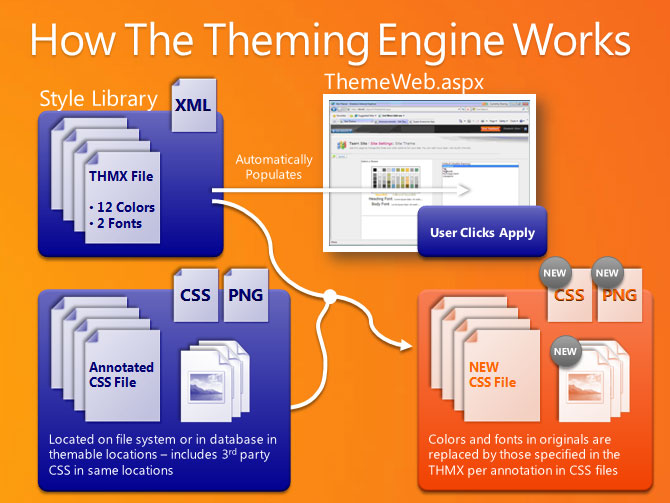
How the SharePoint 2010 Theming Engine Works

Slide shamelessly stolen from Elisabeth Olsen's presentation at SPC09.

What are all the directives? Dunno. There’s absolutely no documentation that I’ve found at the moment. There’s plenty of examples sprinkled throughout the CSS files found in the “Themable” folders though. I’m hoping someone out there compiles a list of all of them sooner rather than later.

In the next episode…

My next post will be on the new and improved CSSRegistration control which is how we can add our own custom CSS that can also take advantage of the new 2010 theming system!

UPDATE:

Vancouver Tech Fest – Creating jQuery Web Parts for SharePoint

November 21st, 2009 Buta Comments

It’s always fun to have your presentation laptop completely meltdown the night before your presentation!

Anyways, here are the presentation material and code:

Microsoft announces Internet Explorer 9 at PDC

November 20th, 2009 Buta Comments

Microsoft has announced they’re busy working away on the next version of Internet Explorer. Some of the more interesting things included:

  • Much better JavaScript performance! IE8 was a nice first step at improving JS performance on IE but still woefully behind the JS profilers and JIT compilers of Firefox, Safari, et al. Early builds of IE9 are already 4 times faster in the SunSpider benchmark than that of IE8 and putting it about par with Firefox 3.5.
  • CSS Level 3! Again early builds apparently are able to pass the majority of the CSS3 Selectors Testsuite, 41 out of 43. Of course, Firefox 3.5 and Safari 4 already completely pass this test. IE8 only passed 22 of these tests by the way.

Where’s more HTML5?

Microsoft was very non-committal about this. They made a good start in IE8 with things like DOM storage, cross document messaging (XDM) and have a built in JSON API, but where’s <video> or more importantly <canvas>?

It’s a promising start for Microsoft with news about IE9’s JS performance and CSS3 compliance. Here’s hoping to Microsoft finding time to implement some of the HTML elements that competitors have already integrated into their browsers. Don’t need IE10 to STILL be playing catch-up.

In Remembrance…

November 11th, 2009 Buta Comments

To those that have fought, and continue to fight, for the freedoms we enjoy everyday.

Categories: General

SPC09: Status Bar and Notification APIs

November 3rd, 2009 Buta Comments

SharePoint 2010 Status Bar and Notification elementsExcuse the really bad screen cap to the right… the Status Bar and Notifications are two UI elements in SharePoint 2010 which allow us to give the user information in context without distracting them. The Status Bar and Notifications are both exposed as client-side JavaScript APIs.

Status Bar

The Status Bar lives below the Ribbon and displays persistent information such as page status or web site alerts. It already existed in SharePoint 2007 as an UI element but it’s functionality was not exposed as an API. It will display an HTML message, which can include links and/or images, on 1 of 4 pre-set background colours depending on the importance of the status defined.

There is a Server API to set statuses at page render time as well as a JavaScript API to dynamically add/remove messages.

The JavaScript API is in the SP.UI.Status namespace and is as follows:

SP.UI.Status.addStatus(strTitle, strHtml, atBeginning)
SP.UI.Status.updateStatus(sid, strHtml)
SP.UI.Status.removeStatus(sid)
SP.UI.Status.removeAllStatus(hide)
SP.UI.Status.setStatusPriColor(sid, strColor)

Notifications

Notifications are brand new to SharePoint 2010 and they are used for transient or semi-transient messages such as action confirmations. Notifications appear on the right side of the page below the ribbon and default to a 5 second display period. Like the Status Bar, the message format is HTML with the ability of including links and/or images.

There is a JavaScript API to add/remove messages. You also have the option to make a Notification “sticky” which means it will continue to display until you manually remove it through the API.

Notifications are in the SP.UI.Notify namespace:

SP.UI.Notify.addNotification(strTitle, bSticky, tooltip, onclickHandler)
SP.UI.Notify.removeNotification(id)

Ninja Gaiden II: Archfiend Madness

November 3rd, 2009 Buta Comments

Scored a free copy of Ninja Gaiden II for free when I went to get Grand Theft Auto IV (which I haven’t even touched other than watching the intro). The final boss battle with the Archfiend is really a expletive spewing, controller-throwing exercise in frustration. I know, I know, shoot the head with the arrow, shoot the orb in his chest, dodge stuff, rinse repeat…

First, if I load the save the game when I boot up the 360, I have to watch the intro video of Hayabusa unlocking the giant black gate and then have to battle the high priest just to get back to the battle with the archfiend! Then I get pummelled by archfiend over and over again.

I must suck… this is way to much effort to put into what could be a shitty ending video.

Categories: Gaming

SharePoint 2010 Developer Hands-on Labs

October 27th, 2009 Buta Comments

Some of the modules from the Hands-on Labs at SPC are available at the SharePoint Developer Center.

Here’s the list of the modules:

  • Module 1: Getting Started Building Web Parts in SharePoint 2010
  • Module 2: What Developers Need to Know About SharePoint 2010
  • Module 3: Building Blocks for Web Part Development in SharePoint 2010
  • Module 4: Accessing SharePoint 2010 Data with Server-Side APIs
  • Module 5: Accessing SharePoint 2010 Data with Client-Side APIs
  • Module 6: Accessing External Data with Business Connectivity Services in SharePoint 2010
  • Module 7: Developing Business Processes with SharePoint 2010 Workflows
  • Module 8: Creating Silverlight User Interfaces for SharePoint 2010 Solutions
  • Module 9: Sandboxed Solutions for Web Parts in SharePoint 2010
  • Module 10: Creating Dialog Boxes and Ribbon Controls for SharePoint 2010
Categories: Development, SharePoint

A tale of two meats

October 27th, 2009 Buta Comments

I only had the opportunity to try out a few restaurants in Vegas last week. Here’s are two of them for you meat lovers out there: one good; one not so good.

Let’s begin with the not so good…

Burger Bar

Located at Mandalay Place in the Mandalay Bay Hotel & Resort, Burger Bar is Chef’s Hubert Keller’s take on the “upscale” burger. You can get burgers made with Ridgefield, Black Angus, American Kobe or even buffalo and they will be cooked to a temperature of your liking. Chef’s burgers range from a classic bacon cheeseburger to the Rossini, a $60USD burger made with Kobe beef, foie gras, truffles and madeira sauce.

So what went wrong? I ordered the Surf & Turf Burger, made with Black Angus, grilled lobster and asparagus. The lobster was overcooked, tough and chewy. The burger itself was done to the correct temperature but completely bland. None of the burger components seemed to have been seasoned in the slightest. I was told when I asked about the lack of seasoning that it was because they wanted to showcase the quality of the beef. I’m sorry, but your beef is bland.

My friend’s had both gotten black pepper corn burgers which they seemed to enjoy, and I would have asked for the black peppercorn sauce on the side. Unfortunately, the lobster was way overdone, so I ended up sending the whole thing back and was done for the night.

I would have liked to link to the official website, but it’s completely in Flash and a mess. Here’s the link the Chef Keller’s main site.

Now onto the good stuff!

StripSteak

Okay, I can’t get myself to capitalize STRIPSTEAK in the heading. STRIPSTEAK is Michael Mina’s steakhouse. It’s located with all the other fine dining establishments at the Mandalay Bay, on the way from the casino to the convention center. I must say that someone could’ve done a better job with that particular section of the hotel as all the restaurants look like they’re in the middle of a food court.

First impressions aside, the food itself was fantastic. We were treated to a trio of french fries, each seasoned differently with accompanying sauces as well as an incredible iron skillet flat bread.

I think we all ordered variations of the sirloin cap steak and I asked for mine black and blue. I have to say that this has to be one of my best steak experiences I’ve ever had. The steak itself was perfectly done, just the right amount of seasoning, completely seared on the outside and a marblely (sic) purple on the inside. Garnishing was simple and elegant, a roasted shallot and a roasted pepper.

The only stumble for that evening was the roasted marrow bones I had ordered. Not enough and it was way too much effort to dig out the marrow. So avoid the marrow bones and order some mac & cheese or creamed spinach instead!

Here’s the menu in PDF format.

I guess this could be called a “Tale of two websites” as well. Mina’s website is much easier to navigate and link to.

Categories: Food & Drink

SPC09: Master Pages

October 21st, 2009 Buta Comments

A quickie: no more application.master!

In Microsoft SharePoint Foundation, application pages can now inherit a customized site master page through the DynamicMasterPageFile attribute.

In addition, there are a few pages which have been designated as Safeguarded Application Pages. These are the application pages that have safeguards against a broken master page. If these pages encounter an error when loading the dynamic master page, a safe master page in the _layouts folder is loaded instead.

  • AccessDenied.aspx
  • MngSiteAdmin.aspx
  • People.aspx
  • RecycleBin.aspx
  • ReGhost.aspx
  • ReqAcc.aspx
  • Settings.aspx
  • UserDisp.aspx
  • ViewLsts.aspx

Check out the documentation on MSDN regarding master pages in SharePoint 2010.